
FansCamera
Built for live shows
Coming soon
The moment a spotlight lands, your phone starts fighting itself: blown-out face, dead black background, smeared motion on the fast songs. FansCamera takes the handful of settings that actually matter on stage and folds them into four cards you pick by what's in front of you. It handles the rest.
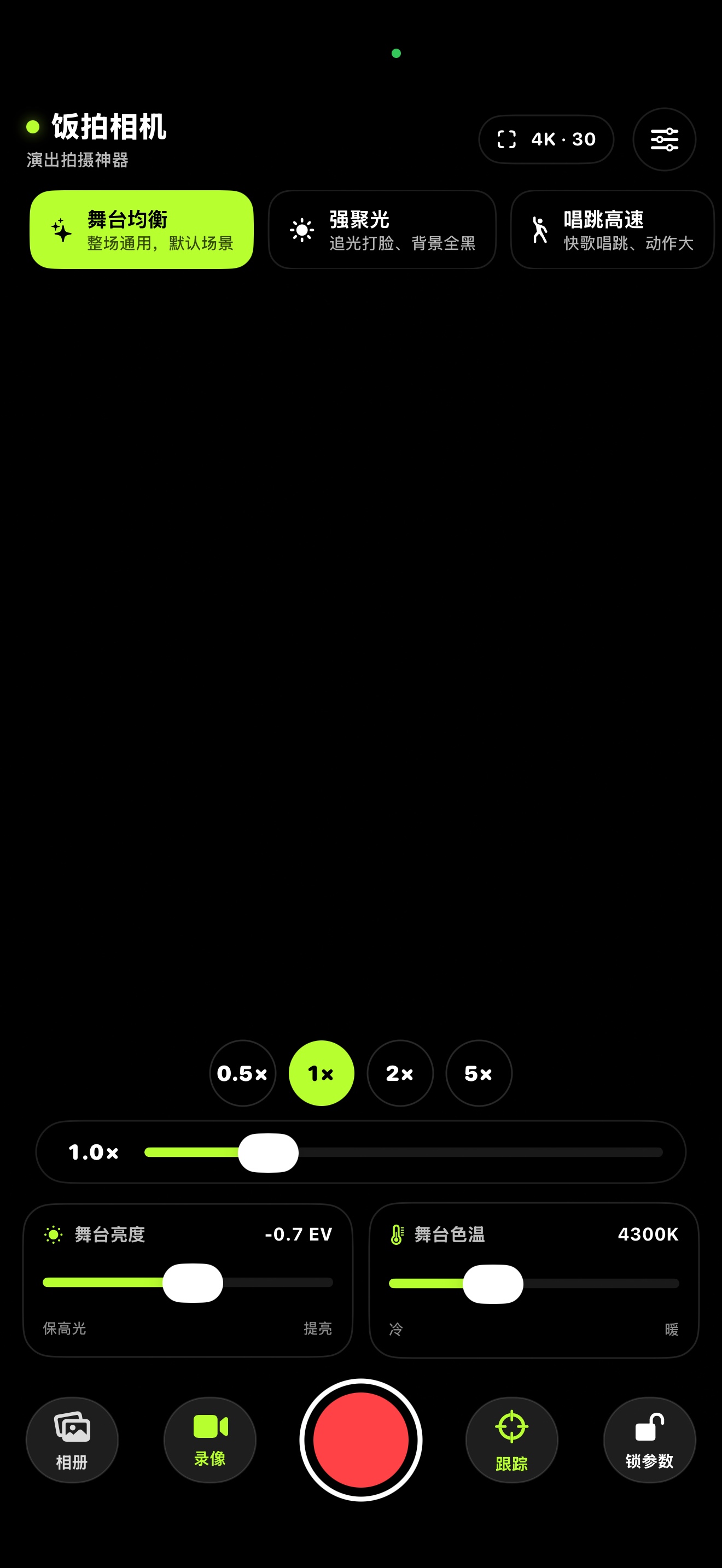
Four cards for a whole show
They aren't filters. Each one swaps a full set of stage settings at once: shutter ceiling, exposure compensation, white balance, metering and focus behaviour.
Balanced
Works for any song. Start here when you're not sure.
- EV −0.7
- 4300K
- Smooth focus
Spotlight
Hard key light, black background. Meters off the face — for when one beam blows out the whole thing.
- EV −1.5
- 3900K
- Face metering
Fast motion
Up-tempo numbers, big choreography. Raises the shutter floor to freeze movement and switches focus to snap fast.
- EV −0.3
- 4300K
- Snap focus
Soft ballad
Slow songs, very dim stage. Keeps the darkness intact but turns on low-light boost so noise doesn't eat the frame.
- EV −0.5
- 4900K
- Low-light boost
Far from the stage, still sharp
Straight to the native lenses
The dots jump directly to your phone's real focal lengths; the slider underneath is for fine adjustment, and it eases through the transition at each lens.
One tap to change format
Tap the top right and it cycles through what your phone actually supports — 4K·24, 4K·30, 4K·60. In a dark room, 4K·30 first.
Brightness and colour in plain words
No ISO, no shutter numbers. Two sliders — "protect highlights ↔ brighten" and "cool ↔ warm" — that you pull while watching the picture.
Subject tracking
Turn it on, tap the performer, and focus follows them. If the lights swallow them or they leave the frame, focus stays put instead of hunting.
Lock the settings
One tap locks focus and exposure, so the picture stops pulsing every time the lighting jumps — and stray taps can't change anything.
Custom watermark
Two lines of your own text — a handle, a venue, a date — burned into the footage, positioned exactly where you see it in the viewfinder.
Better live audio
Reduces how much automatic gain and voice processing mangle a loud room, so the chorus doesn't collapse into mush.
Framing and quality options
Rule-of-thirds grid, torch, stabilisation levels, HDR video and Log colour — all in settings, on when you want them.
Screen lock while recording
Once you hit record, the top-right button becomes a palm icon. Tap it and the whole screen locks — hold the phone up for an entire song without touching anything by mistake.
Not out yet — but close
FansCamera is in the final stretch before review. Leave us an email address and we'll send you the App Store link the day it goes live. Nothing else.
About Pro
The free version records up to 15 seconds per clip, which covers a single fancam take. Pro is a monthly auto-renewing subscription that removes the length limit, and you can cancel any time in iOS Settings.
Details
- PlatformiPhone · rear camera required
- StatusIn development, review pending
- RecordingUp to 4K·60, device permitting
- ColourStandard / HDR / Log
- App languageSimplified Chinese
- PriceFree, Pro is optional